


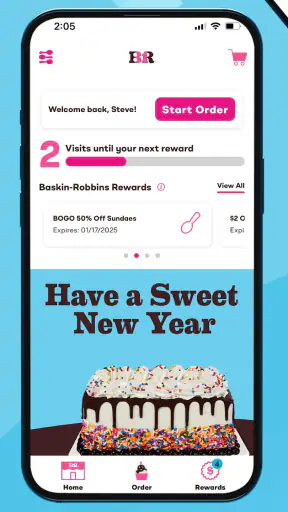
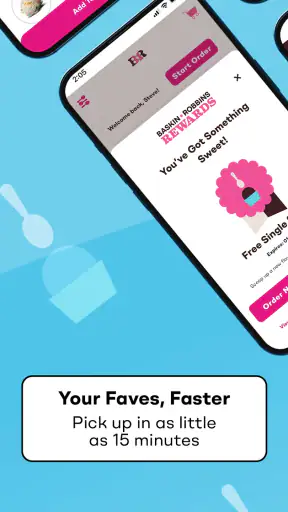
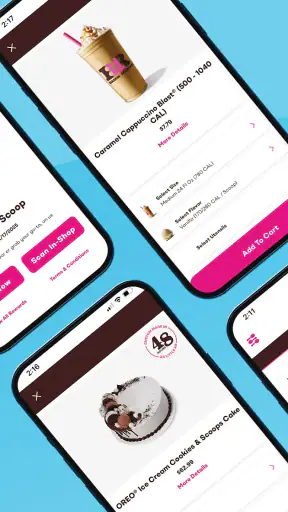
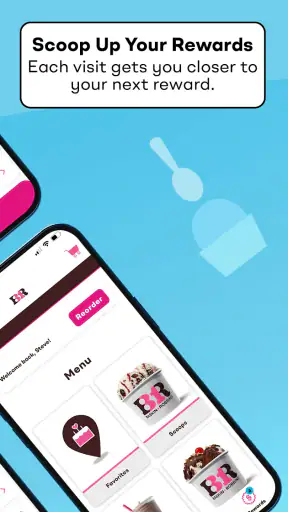
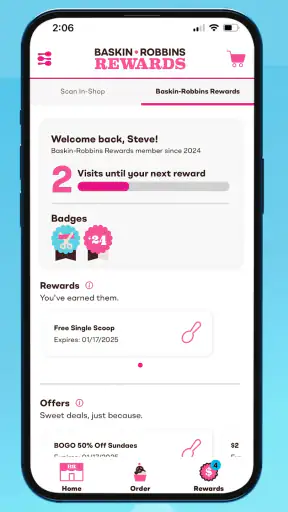

I see the Baskin-Robbins app as a useful companion for people who already buy from the ice cream chain, rather than a complete replacement for every part of the in-store experience. Its main value is convenience: it brings sweet-treat discovery, offers, and brand information together in one place so I can check what is available before deciding what to order. That sounds simple, but it matters when I am choosing a dessert for a family, planning a quick stop, or trying to make a visit feel a little more worthwhile.
After spending time with it, my overall impression is positive but measured. It works best as a visit-planning and deal-checking tool, not as an essential everyday app. The experience is aimed at people who enjoy Baskin-Robbins products and want a faster way to browse the brand’s options. If I rarely visit the chain, I would probably keep using a browser or simply decide at the counter. If I visit regularly, the app has a clearer reason to stay installed.
What the Baskin-Robbins app is really good at
Baskin-Robbins Mobile develops this free Food & Drink app for Android users, with an Everyone content rating. It has been available since July 31, 2016, and the current version is 4.16.1. The long presence on the platform suggests that this is not a short-lived promotional experiment; it is an established brand app intended to support customers around their visits.
The first thing I appreciate is the way the app focuses on the decision I am actually trying to make: what sweet treat should I get, and is there a reason to visit today? Instead of treating the app like a general food journal or a broad delivery marketplace, it stays close to Baskin-Robbins’ identity. That narrow focus can feel limited, but it also keeps the experience more relevant when I already know which chain I want.
The store summary presents the app as a place to discover treats, deals, and more. In practical use, that positioning makes sense. I can approach it when I want to browse before leaving home, when I am looking for a dessert idea, or when I want to see whether the brand has something that suits a particular occasion. It is especially handy when I am choosing for more than one person, because browsing on a phone is less rushed than standing in front of a counter while everyone changes their mind.
That browsing step is more important than it may sound. Ice cream decisions are often impulsive, but they can also involve preferences, portion choices, and group compromises. A child may want something colorful, another person may prefer a familiar flavor, and I may be looking for a treat that feels appropriate after a meal. Having a brand-focused place to look can reduce that last-minute uncertainty.
Useful before a planned visit
My favorite use case is preparing for a stop rather than opening the app only after I arrive. Imagine a warm afternoon when I am taking two children out after school. Instead of asking everyone to choose at the counter, I can browse first, discuss the options in the car, and arrive with a rough plan. That makes the visit calmer and helps avoid the familiar situation where one person is still deciding while the line grows behind us.
This also works for small gatherings. If I am bringing dessert home for several people, the app gives me a brand-specific starting point for thinking about what to buy. I can use it to narrow down the kind of treat I want before checking the practical details at the shop. The important benefit is not that the app makes a complicated order effortless; it is that it moves some of the browsing away from a noisy, time-pressured environment.
A less obvious advantage is that the app can help me separate inspiration from commitment. I may open it with no exact order in mind, notice a treat that fits the occasion, and then decide whether it is worth making the trip. That is different from a basic store locator or a loyalty screen, because those tools answer where to go or what benefit I have, while this type of app helps shape the choice itself.
Deals are useful, but require attention
Deals are another reason to open the app, especially when I am already planning a visit. A promotion can change whether I choose Baskin-Robbins over a supermarket dessert or another nearby ice cream shop. I like having promotional information close to the product browsing experience because it keeps the decision in one place instead of making me search separately for offers.
Still, I would not treat every displayed deal as an automatic reason to buy. Promotions can affect the best choice for one person differently from the best choice for a family. A discount may be worthwhile when I am buying several items, but less meaningful when I only want a small personal treat. My practical tip is to decide what I would normally order first, then see whether an offer improves that plan. Otherwise, the app can encourage an unnecessary purchase simply because something appears attractive on screen.
That is one of the trade-offs of a branded food app: convenience and promotion are closely connected. The app can save me money when I use a relevant deal, but it can also make an extra visit feel tempting. I find it most valuable when I use it with a clear purpose, such as checking an offer before a planned dessert stop, rather than opening it whenever I am bored.
A focused experience instead of a broad food platform
Compared with a general delivery service, the Baskin-Robbins app has a much narrower job. A delivery marketplace is better when I want to compare several restaurants, see delivery fees, combine items from different places, or track an order across a larger platform. This app is better when I have already chosen Baskin-Robbins and want brand-specific information without sorting through unrelated restaurants.
Compared with a normal web search, the app can feel more direct because it is built around the chain’s own treats and promotions. A search engine may show scattered pages, images, and third-party results, while the app gives me a more focused starting point. On the other hand, a browser can be more convenient for someone who visits rarely, has limited phone storage, or does not want another app on the home screen.
It also differs from a simple store-locator tool. A locator answers a geographic question, but it does not necessarily help me decide what to get or whether a promotion is relevant. The Baskin-Robbins app is more useful earlier in the process, when I am still browsing and planning. If I already know my order and only need the nearest location, a lighter tool may be enough.
The main weakness is the limited reason to return
The app’s strength is also its biggest limitation: it is tightly tied to one brand and one type of purchase. I do not need it every day, and I would not recommend installing it to someone who visits Baskin-Robbins only once or twice a year. The experience makes the most sense when I have a recurring relationship with the chain or when current offers give me a specific reason to check it.
That limited frequency affects how I judge convenience. Installing an app, keeping it updated, and remembering to open it can be more effort than simply making a spontaneous decision at the counter. For an occasional customer, the usual alternatives may be better: browse the brand’s public information when needed, ask staff about current choices, or use a general search tool to find a nearby shop.
I also think branded apps need to earn their place through clarity. When I open one, I want to understand quickly what is available, what is relevant today, and what action I should take next. If the app makes me move through too many promotional screens before reaching useful information, the convenience advantage disappears. My advice is to judge it by the speed of the task you care about. If it helps you browse and check an offer quickly, it is doing its job; if it feels like a detour before a simple purchase, it may not be worth keeping.
Who should install it?
I would recommend it most strongly to regular Baskin-Robbins customers, families who make planned dessert stops, and people who enjoy browsing seasonal or promotional treats before visiting. It is also a sensible choice for anyone who prefers to make decisions privately on a phone rather than at a busy counter. The app can be particularly helpful when several people are ordering together and you want to settle preferences before arriving.
It is less suitable for someone who wants a universal food-ordering solution. If your priority is comparing restaurants, arranging delivery from multiple businesses, managing a broad rewards routine, or ordering from many types of cuisine, this focused app will not replace a larger food platform. Likewise, if you do not care about browsing treats or checking deals, its purpose becomes much smaller.
Parents may find the pre-visit browsing habit especially practical. I would open the app before leaving, let everyone choose a general direction, and use the visit itself for the final decision. That workflow avoids promising an exact item too early while still preventing the entire group from starting from zero at the counter. It is a small change, but it makes the app feel more useful than simply scrolling through it without a plan.
For a solo customer, the benefit is different. I can use the app when I want to try something outside my usual order, compare the appeal of different sweet treats, or decide whether a promotion makes a visit worthwhile. The app is not necessarily changing my whole food routine; it is helping me make a more informed choice within a specific craving.
What the rating and reach suggest
The app holds a 3.2 average from around 4.9 thousand ratings, with roughly 2.1 thousand written reviews. I read that as a sign of a mixed but meaningful user experience: enough people find value in it for the app to remain relevant, while the score also suggests that convenience may vary depending on what each person expects from a branded food app.
Its reach is substantial, with more than one million installs. That does not automatically make it right for me, but it does show that the app serves a recognizable customer need. I would interpret the combination of broad adoption and a middling average carefully. It is not a universal recommendation; it is a tool whose usefulness depends heavily on whether I regularly interact with the brand.
The minimum operating requirement is Android 8.0, which makes the app accessible to many users with older supported phones while still setting a clear boundary for very old devices. Before planning to rely on it for a visit, I would install and open it at home rather than waiting until I am outside the shop. That simple check gives me time to update the app, sign in if needed, and understand the current layout without holding up an order.
Small habits that make it more useful
My first tip is to open the app before hunger makes the decision for you. Browsing while rushed can lead to choosing the first familiar item, which defeats much of the discovery value. A few minutes earlier, I can compare possibilities, decide how much I want to spend, and check whether an offer actually fits my plan.
My second tip is to treat promotions as a comparison tool rather than a shopping command. I would write down the order I was already considering, then see whether the offer changes the value. This is especially important for a group, where a deal may be attractive only if everyone wants the qualifying items.
My third tip is to keep the app for specific occasions if storage or notification clutter matters to you. I do not think every customer needs permanent access to a single-chain dessert app. Someone who visits during holidays, birthdays, or occasional family outings could install it when planning those visits and remove it afterward if it no longer serves a purpose.
A fourth useful habit is to use the app as a conversation starter for group orders, not as the final authority on every detail. I can browse ideas there, but I still prefer to confirm practical questions at the shop before assuming that every option will suit the exact location or moment. That approach keeps expectations realistic and avoids turning an appealing screen into a promise about the in-person experience.
My final recommendation
Baskin-Robbins is worth trying if you already enjoy the chain and want a convenient way to browse treats and check deals before a visit. I like its focused purpose, especially for family planning and pre-visit decisions, and I think the free price makes experimenting with it low risk. The developer, Baskin Robbins Mobile, has kept the app centered on the brand rather than trying to become a general food platform, which gives it a clear identity.
My reservation is that the app may not justify permanent space on every phone. Its value depends on frequency, timing, and whether the available promotions or browsing tools improve the way you already buy dessert. A regular customer can get practical value from it; an occasional visitor may be better served by a browser or a quick stop at the counter.
In the end, I see it as a helpful planning layer around a Baskin-Robbins visit, not a must-have app. I would recommend it to families, repeat customers, and curious dessert fans who like deciding in advance. I would skip it if I want broad restaurant comparison or if my Baskin-Robbins visits are too rare to make another branded app worthwhile.


